
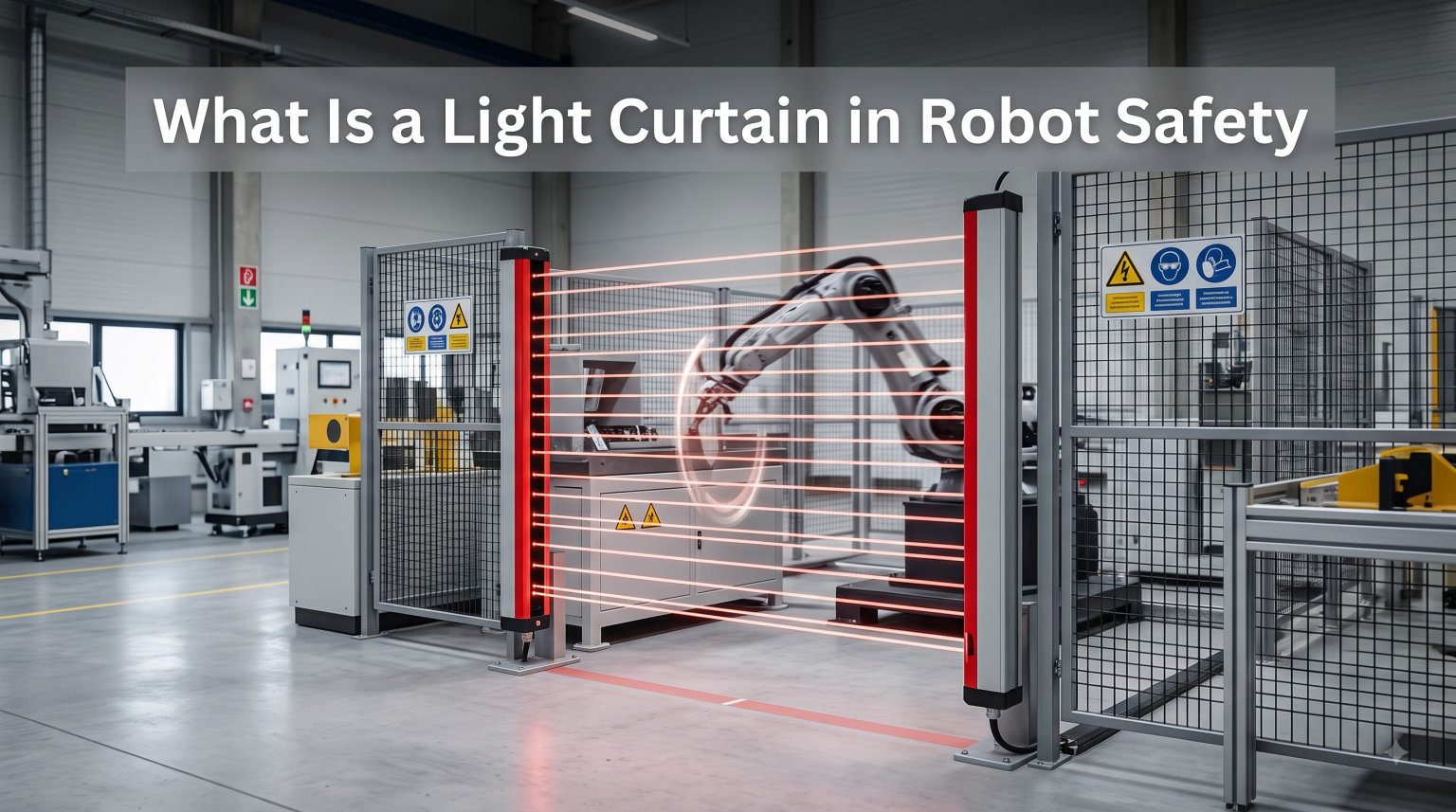
A light curtain in robot safety is an electro-sensitive protective device that uses an array of infrared light beams to detect when a person or object enters a hazardous area around a robot or machine. When any beam is broken, the curtain sends a stop signal within milliseconds, cutting power before the worker reaches the moving parts.
I have spent time on factory floors watching these devices do their job, and they are one of the most common forms of perimeter guarding you will find in any modern robotic work cell. They replace the old cages of solid metal with an invisible fence, which is a huge improvement for productivity and ergonomics.
If you are an automation engineer, a safety officer, or a robotics student, this guide will give you a complete working knowledge of how light curtains protect people around robots. We will cover the technical operation, the type classifications, the relevant safety standards, and the practical installation considerations that matter on a real shop floor.
Table of Contents
What Is a Light Curtain in Robot Safety
A light curtain is a safety device that creates an invisible plane of infrared light beams between a transmitter and a receiver. When any beam in that plane is interrupted, the system immediately sends a stop command to the machine it is guarding. In robot safety applications, light curtains protect workers from the pinch points, swing zones, and high-speed motion paths of industrial robots and automated equipment.
Light curtains fall into the broader category of electro-sensitive protective equipment (ESPE), which is the technical term used in international safety standards. They are also called safety light barriers, photoelectric safety curtains, or simply light guards. Whatever the name, the purpose is the same: stop dangerous motion before a person gets hurt.
The concept is simple. Two vertical columns, one on each side of the hazard, talk to each other using a curtain of light. If your hand, arm, or body crosses that curtain, the machine stops. That simplicity is why light curtains have been the workhorse of machine guarding since Erwin Sick patented the first commercial version in 1972.
How Safety Light Curtains Work
Safety light curtains work by projecting sequential, pulsed infrared beams from a transmitter unit to a receiver unit mounted opposite each other. Each beam is checked thousands of times per second. When the receiver detects that one or more beams are blocked, it switches its safety outputs to a safe state, telling the machine controller to stop the hazard.
The Transmitter and Receiver System
The transmitter is a slim column containing an array of infrared LEDs or laser diodes stacked vertically. Each LED creates one beam line in the curtain. The receiver on the opposite side has matching photodiodes or phototransistors that detect the incoming light. Together, they form a flat detection zone, typically 150 mm to 1800 mm tall depending on the protected opening.
Resolution is the term for the spacing between adjacent beams. A finger-detection curtain might have 14 mm beam spacing, while a whole-body perimeter guard might use 40 mm or 50 mm spacing. The finer the resolution, the smaller the object the curtain can detect, but the more expensive and sensitive the unit becomes.
Sequenced Beam Scanning
Modern light curtains do not fire all beams at once. They sequence them in a rapid scanning pattern, lighting each beam in turn for microseconds. This lets the receiver know exactly which beam was broken and lets the system detect partial intrusions like a hand reaching through the bottom of the field while the rest of the body is still outside.
Sequencing also provides built-in fault detection. If a beam fails to fire or the receiver cannot find it within the expected time window, the controller flags a fault and puts the system in a safe state. This is why a light curtain cannot be bypassed by taping over a single beam, as older single-beam light barriers sometimes could.
OSSD Outputs and Safety Relays
The receiver sends its stop signal through OSSD outputs. OSSD stands for Output Signal Switching Device, and it is the standard interface defined by IEC 61496-1. An OSSD is a pair of solid-state outputs that pulse-test each other to detect short circuits. If either output shorts to ground, to voltage, or to the other channel, the system locks out.
These OSSD signals feed into a safety relay, a safety PLC, or the robot’s safety-rated controller. The relay then removes power from the motor contactors or servo drives, bringing the hazard to a safe stop. The whole chain, from beam break to motor de-energization, typically happens in 8 ms to 30 ms depending on the curtain model.
Forum discussions on r/PLC often highlight the importance of understanding OSSD pulse testing. Technicians new to safety wiring sometimes mistake the brief test pulses for noise or faults, when in fact they are the system’s way of proving that the wiring is still intact.
Key Components of a Light Curtain System
A complete light curtain system for a robot work cell includes the transmitter, the receiver, mounting hardware, a safety relay or safety controller, connection cables, and often a muting module. Each component plays a role in maintaining the safety integrity of the system.
The transmitter and receiver are optically synchronized, either through a hard-wired connection or through an optical sync beam in the first or last channel. Optical sync models are easier to install because they need only one cable run, but they require a clear line of sight in that specific channel.
The safety relay is the brains of the wiring. It monitors the OSSD outputs, checks for cross-faults, and provides force-guided contacts to drop out the machine’s main contactors. In modern robot cells, the safety relay is often replaced by a safety PLC or a safety motion controller integrated with the robot.
Mounting brackets and shock absorbers matter more than most people think. A light curtain that can be bumped out of alignment is a light curtain that will nuisance-trip or, worse, fail to detect. Industrial-grade brackets with vibration isolation are worth the extra cost in any high-cycle robot application.
Connection cables must be rated for the environment. In a welding cell, for example, you need weld-spatter-resistant jackets and IP67 or IP69K rated connectors. Cutting corners on cables is one of the most common causes of intermittent light curtain faults I have seen in practice.
Types of Safety Light Curtains (Type 2, Type 3, Type 4)
Safety light curtains are classified by type under IEC 61496-1 and IEC 61496-2. The type tells you the level of fault tolerance, the appropriate safety integrity level, and the kinds of hazards the curtain is rated to protect against. Most robot safety applications use Type 4, with Type 2 reserved for lower-risk machines.
| Feature | Type 2 | Type 3 | Type 4 |
|---|---|---|---|
| Fault tolerance | Single fault may lead to loss of safety | Single fault detected, accumulated faults may cause loss | Single fault detected and safe; no fault accumulation |
| Typical SIL rating | SIL 1 / PL c | SIL 2 / PL d | SIL 3 / PL e |
| Self-test frequency | Periodic test | Periodic test | Continuous self-test on every cycle |
| Typical use | Light industrial machines | Limited industrial use | Robotic work cells, presses, high-hazard machinery |
| Redundancy | Single-channel architecture | Partial redundancy | Full dual-channel redundancy |
Type 2 Light Curtains
Type 2 light curtains use a single-channel architecture with periodic self-testing. They are designed for lower-risk applications where a single fault is unlikely to cause immediate danger. Typical uses include small packaging machines, light assembly stations, and auxiliary equipment where the hazard is limited.
Type 2 devices correspond to SIL 1 and Performance Level c under ISO 13849-1. They are not appropriate for most robot work cells, where a single undetected fault could lead to serious injury. Always check your risk assessment before choosing Type 2 for a robotic application.
Type 3 Light Curtains
Type 3 light curtains are uncommon in the field. They offer partial redundancy and detect single faults, but they can lose safety function if faults accumulate. The Pilz catalog describes them as a niche middle ground, and most safety engineers skip directly from Type 2 considerations to Type 4 for anything involving a moving robot.
Type 3 corresponds to SIL 2 and Performance Level d. Some manufacturers offer Type 3 light curtains for specific medium-risk applications, but the market presence is small. If you are specifying a light curtain for a robot cell, your risk assessment will almost certainly point to Type 4.
Type 4 Light Curtains
Type 4 light curtains are the standard for robotic work cell safeguarding. They use full dual-channel redundancy, continuous self-testing on every cycle, and fault annunciation that meets the highest safety integrity levels. A single fault anywhere in the system is detected immediately and the system goes to a safe state without any loss of protective function.
Type 4 light curtains correspond to SIL 3 and Performance Level e, the highest practical rating for a single safety device. They are required for most robot applications under ANSI/RIA R15.06 and ISO 10218. If you are guarding a six-axis robot, a SCARA, a delta robot, or any collaborative robot operating in power-and-force-limited mode, Type 4 is what you should be specifying.
Light Curtain Safety Standards and Ratings
Light curtain safety is governed by a stack of international standards that define the device performance, the integration requirements, and the risk assessment methodology. Understanding these standards is essential for proper specification, installation, and compliance.
IEC 61496 Explained
IEC 61496 is the international standard for electro-sensitive protective equipment. Part 1 covers general requirements and testing, while Part 2 covers active optoelectronic protective devices, which is the technical category that includes safety light curtains. The standard defines the type classifications (Type 2, Type 3, Type 4) and the requirements for fault detection, response time, and OSSD behavior.
A light curtain cannot be marketed as a safety device unless it has been certified to IEC 61496 by an accredited testing body. Look for the TUV, UL, or equivalent mark on the device nameplate. Anything without that mark is a presence-sensing sensor, not a safety device, and should not be used for personnel protection.
SIL and Performance Level Ratings
SIL stands for Safety Integrity Level and is defined in IEC 61508. It ranges from SIL 1 (lowest) to SIL 4 (highest) and represents the probability of dangerous failure per hour. Most light curtains are rated SIL 1, SIL 2, or SIL 3, corresponding to Type 2, Type 3, and Type 4 respectively.
Performance Level (PL) is the parallel rating system under ISO 13849-1, ranging from PL a to PL e. It considers not just the probability of failure but also the diagnostic coverage, the mean time to dangerous failure, and the common cause failure resistance. For robot cells, the target is almost always PL d or PL e, which means SIL 2 or SIL 3 hardware.
You calculate the required SIL or PL using a risk assessment that considers the severity of injury, the frequency of exposure, and the possibility of avoidance. The result of that assessment, written down and signed by a qualified safety engineer, is the document that justifies your choice of light curtain type.
ANSI and OSHA Requirements
In the United States, the relevant standards include ANSI B11.19 for performance criteria for safeguarding, ANSI/RIA R15.06 for industrial robot safety, and OSHA 29 CFR 1910.212 for general machine guarding requirements. OSHA enforces the requirement that any machine capable of causing injury must be guarded, and light curtains are an accepted means of compliance when properly applied.
ANSI/RIA R15.06-2012 (and the updated ISO 10218-1 and 10218-2) require that any presence-sensing safeguard used with an industrial robot must meet at least PL d. In practice, this rules out Type 2 light curtains for almost all robot applications, leaving Type 4 as the safe and compliant choice.
Applications in Robotic Work Cells
Light curtains are used in robotic work cells to safeguard operator stations, material entry and exit points, and maintenance access areas. They are the standard safeguarding device for perimeter guarding around large robots, point-of-operation guarding on press lines, and access control on automated assembly and packaging machinery.
Common robot cell applications include:
- Perimeter guarding: Vertical light curtain columns form the safety boundary around a multi-robot cell, stopping all motion if any worker crosses the threshold.
- Material entry/exit: Horizontal or L-shaped curtains protect conveyor openings where parts move in and out of the work envelope.
- Press operations: Press brake light curtains allow the operator to hold the part during the stroke, stopping motion if a hand enters the pinch point.
- Cobot work zones: Collaborative robot cells use light curtains to define the reduced-speed collaborative workspace and trigger protective stops if a person enters the higher-speed zone beyond.
- Assembly stations: Light curtains allow hands-on assembly within a guarded area while automatically stopping the robot if a person reaches into the active workspace.
- Logistics and palletizing: Curtain arrays around palletizers protect workers from the swing of the robot arm during pick-and-place cycles.
When integrating with collaborative robots, light curtains are often used to define the boundary between the collaborative workspace (low speed, power-and-force-limited) and the higher-speed zone outside it. If a worker crosses the curtain, the cobot drops to a full protective stop rather than continuing in collaborative mode.
Light Curtain vs Laser Scanner: Key Differences
A light curtain creates a flat, two-dimensional detection plane between a fixed transmitter and receiver, while a laser scanner creates a two-dimensional detection field by sweeping a laser beam through 270 degrees from a single stationary unit. Both detect presence and trigger safety stops, but the geometry and flexibility differ significantly.
Light curtains are best when you need to guard a defined opening with a clear, repeatable detection plane: a press brake, a conveyor opening, a robotic cell perimeter. They are cheaper, simpler to wire, and easier to align. The trade-off is that they only protect the one plane they cover.
Laser scanners protect a wider area with a configurable detection field, which is useful for mobile robots, AGVs, and irregularly shaped work zones. They are more expensive, can be more complex to configure, and can be fooled by shiny surfaces or steam in the environment. Choose the device that matches the geometry of the hazard.
| Feature | Light Curtain | Laser Scanner |
|---|---|---|
| Detection geometry | Flat plane between two columns | 2D swept field, up to 270 degrees |
| Best for | Defined openings, fixed perimeters | Mobile robots, irregular zones |
| Typical range | Up to 60 m (long-range models) | Up to 9 m safety field, 50 m warning |
| Cost | Lower | Higher |
| Configuration | Fixed resolution and height | Programmable field shapes |
| Alignment sensitivity | High | Low |
Installation Best Practices
Proper installation is the difference between a light curtain that protects workers for a decade and one that nuisance-trips every shift. The three areas that matter most are mounting and alignment, safety distance calculation, and the wiring interface to the robot or machine controller.
Mounting and Alignment
Mount the transmitter and receiver on rigid, vibration-isolated brackets that cannot be knocked out of alignment by routine operations. The light curtain must be mounted outside the range of robot movement and outside the reach of any moving part that could bypass the detection plane.
Alignment is critical. The optical axis of each beam on the transmitter must line up with the corresponding beam on the receiver. Most modern curtains have a built-in alignment indicator, either an LED bar graph or a numeric display that shows signal strength. Use it during commissioning and lock the brackets down only after the indicator shows full signal across the entire height.
Calculating Safety Distance
The safety distance is the minimum distance from the light curtain to the hazard that ensures the machine can stop before the worker reaches the danger point. The calculation is defined in ISO 13855 and considers the stopping time of the machine, the response time of the light curtain, the resolution of the curtain, and an approach speed constant.
For a typical robot cell with a 250 ms total stop time, a 14 mm resolution curtain, and a 1600 mm/s approach speed, the minimum safety distance comes out to roughly 500 mm. Add a margin for floor conditions, slippery shoes, and unexpected worker behavior, and you usually end up with 700 mm to 1000 mm in practice.
Wiring and Integration
Wire the OSSD outputs to a safety relay or safety PLC that is rated for the same SIL or PL as the curtain. Do not tap the OSSD signals into a standard PLC input for the safety function, because standard PLCs do not have the diagnostic coverage required for safety-rated control.
Use shielded cable, route it away from VFD cables and other noise sources, and ground the shield at one end only. Power the light curtain from a dedicated 24 VDC supply that is monitored for undervoltage. Forum threads on r/PLC repeatedly emphasize that most nuisance trips trace back to wiring and grounding issues rather than the light curtain itself.
If you are wiring a new robot cell, our guide on robot power system safety walks through the broader wiring practices that keep safety circuits clean and reliable.
Muting Function and Common Troubleshooting
The muting function temporarily disables the light curtain’s protective stop signal under controlled conditions, allowing legitimate material to pass through the detection field without stopping the machine. Muting is commonly used on conveyor entries and exits where parts, not people, need to cross the curtain.
Muting is implemented with two or four independent muting sensors, usually photoelectric eyes or inductive proximity sensors, that must be activated in a defined sequence to allow a pass-through. The muting condition is only valid for a defined time window, and any deviation from the expected sequence immediately drops the system out of mute.
Common troubleshooting issues include:
- Nuisance trips on conveyor start-up: Usually a wiring or grounding issue. Check the shield termination and the OSSD cable routing.
- Muting sequence faults: The muting sensors are not seeing the part in the right order. Check the sensor mounting positions and the wiring to the muting controller.
- Intermittent beam faults in cold weather: Condensation on the optical faces. Use heaters or anti-fog coatings rated for the device.
- OSSD lockout after a beam is blocked: This is normal latching behavior. Most Type 4 curtains latch off after a stop and require a manual reset. Check that the reset circuit is wired correctly.
- Short circuit detected on OSSD: The pulse test caught a fault. Check the wiring for pinched insulation or moisture ingress in the connectors.
Always consult the manufacturer’s manual for the specific fault code before touching anything. A safety device that trips is doing its job, and bypassing it because you cannot figure out the fault is never the right answer.
Frequently Asked Questions
What is the purpose of a light curtain?
The purpose of a light curtain is to create an invisible infrared detection plane that stops a machine or robot when a person or object enters a protected area. It serves as a non-contact safeguard, replacing physical barriers while maintaining access for operators.
What are the differences between Type 2 and Type 4 safety light curtains?
Type 2 light curtains use a single-channel architecture with periodic self-testing and are rated for SIL 1 / PL c applications with lower risk. Type 4 light curtains use full dual-channel redundancy with continuous self-testing on every cycle, are rated for SIL 3 / PL e, and are the standard for robotic work cells and high-hazard machinery.
What is a safety light curtain used for?
A safety light curtain is used to guard robotic work cells, press brakes, conveyor openings, automated assembly stations, and palletizing cells. It detects when a person enters a danger zone and triggers a protective stop, allowing legitimate operator access while preventing contact with moving parts.
What is the difference between a light curtain and a laser scanner?
A light curtain creates a flat detection plane between a fixed transmitter and receiver, ideal for defined openings and fixed perimeters. A laser scanner sweeps a 2D field up to 270 degrees from a single unit, ideal for mobile robots, AGVs, and irregularly shaped work zones.
Conclusion
A light curtain is one of the most effective tools available for robot safety, and understanding how it works is essential for anyone designing or operating an automated work cell. Choose Type 4 for any application involving a moving robot, calculate the safety distance to ISO 13855, and wire the OSSD outputs through a properly rated safety relay or safety PLC.
Light curtain robot safety comes down to three things: pick the right type for the risk, install it at the right distance, and never bypass the latching reset. If you want to deepen your knowledge further, look at how light curtains connect to broader safety circuits in our guide on robot power system safety, or explore other fundamentals like FPGA in robotics and robot gearing precision.